

Published: February 25, 2024 · Last reviewed: May 1, 2026
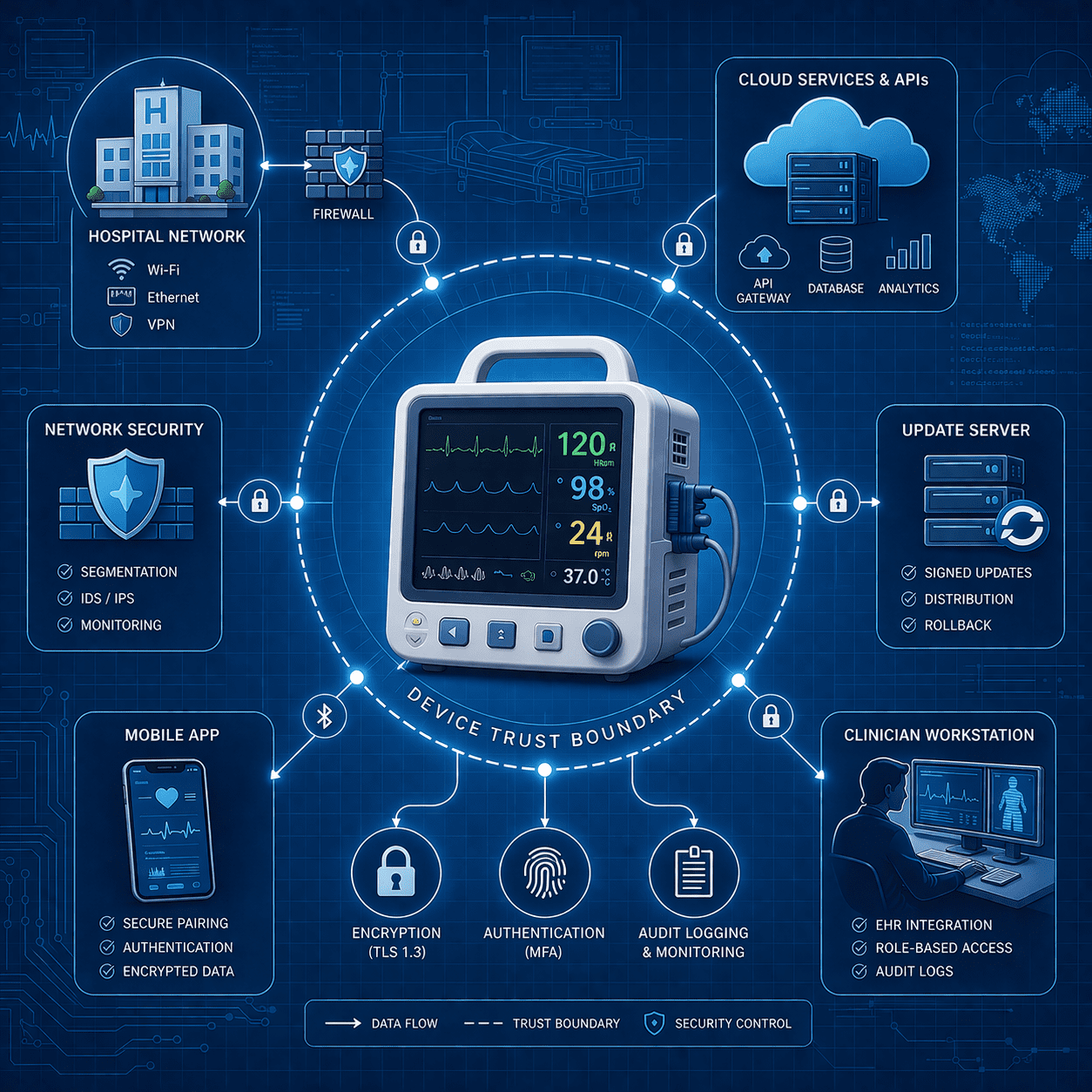
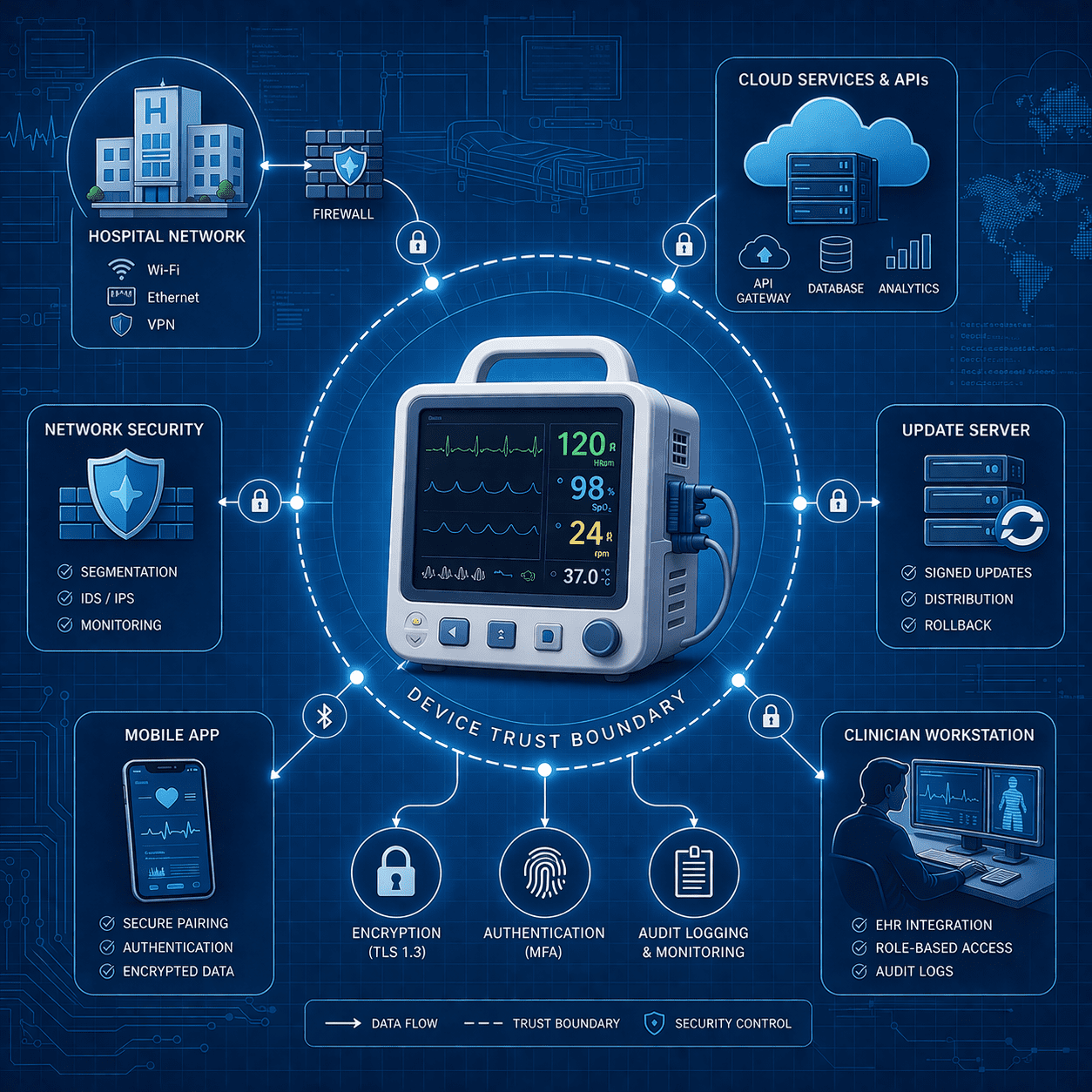
Security Architecture Views (SAVs) are the four FDA-recommended diagrams that describe how a medical device system is architected for security: the global system view, the multi-patient harm view, the updateability/patchability view, and security use case views. They are required reading for FDA reviewers under the Feb 3, 2026 final premarket cybersecurity guidance and are distinct from a data flow diagram (DFD), which is a lower-level analysis model. SAVs sit on top of the DFD and answer architectural questions; the DFD answers data-movement and trust-boundary questions.
How is this different from a DFD? A data flow diagram is the low-level model of processes, data stores, flows, and trust boundaries that feeds STRIDE threat modeling. The Security Architecture Views described below are higher-level FDA-defined abstractions drawn from the same underlying system. Maintain the DFD as the source of truth; regenerate the SAVs from it.
Why this matters
The criticality of cybersecurity in medical devices cannot be overstated; device failures or compromises can lead to patient harm, data breaches, and significant financial and reputational damage. Security architecture diagrams are central to demonstrating due diligence and compliance. The FDA's 'Cybersecurity in Medical Devices' Final Guidance dated February 3, 2026, emphasizes the need for a system-level security approach, requiring manufacturers to provide clear documentation of their device's cybersecurity architecture throughout its lifecycle.
These diagrams are not just regulatory hurdles; they are foundational tools for effective security engineering. They facilitate early identification of vulnerabilities, enable structured threat modeling (e.g., following IEC 81001-5-1 and AAMI TIR57 principles), and support robust risk management per ISO 14971. By visually representing trust boundaries, data flows, and control placements, diagrams help development teams ensure that security is 'designed in' rather than an afterthought. They streamline communication across interdisciplinary teams, from hardware engineers to software developers and quality assurance personnel, ensuring a unified understanding of the device's attack surface and mitigation strategies. Ultimately, well-crafted security architecture diagrams reduce submission back-and-forth with the FDA, accelerate time to market, and build confidence in the safety and security of medical devices.
What is a security architecture diagram in a medical device context?
A security architecture diagram is a visual model of your device ecosystem and the security controls that protect it. In medical devices, that usually includes:
- The device hardware and embedded software
- Companion apps (mobile, desktop, clinician tools)
- Cloud services, APIs, and analytics platforms
- Hospital network connectivity (wired, Wi-Fi, VPN, gateways)
- Identity, authentication, authorization, and key management
- Update infrastructure (build pipeline, signing, distribution, rollback)
- Data flows for PHI and operational telemetry
Done well, these diagrams make cybersecurity risk discussions concrete. Instead of debating “what if” in the abstract, your team can point to a specific interface, trust boundary, or workflow and decide what control belongs there.
Why security architecture diagrams matter for FDA-ready cybersecurity
FDA’s premarket cybersecurity expectations increasingly focus on system-level security and evidence across the product lifecycle. Clear architecture diagrams help you show that cybersecurity is designed in, not bolted on at the end. They also reduce back-and-forth by answering the questions reviewers ask first:
- What connects to what, and why?
- Where are the trust boundaries?
- Where does sensitive data flow, and how is it protected?
- How do updates work, end-to-end?
- What happens when something goes wrong?
Practically, diagrams support multiple submission artifacts, including threat modeling, cybersecurity risk assessment, testing plans, and labeling. If you want a structured way to organize all the typical deliverables, see our guide on the FDA’s cybersecurity deliverables.
The four diagram “views” that typically answer the hardest questions
Most teams struggle because they try to build one diagram that does everything. A better approach is to create a small set of views, each with a specific purpose. FDA also discusses security architecture “views” in its premarket cybersecurity guidance. Start here if you want examples: Security architecture views for medical device cybersecurity.
1) Global system view
This is the map. Show all major components and connections: device, apps, cloud, networks, update servers, third parties. Mark trust boundaries explicitly and label interfaces (BLE, USB, HTTPS, MQTT, proprietary protocols).
Include: data types, security controls at each boundary (auth, encryption, authorization), and any external dependencies.
2) Multi-patient harm view
Medical device risk is different because one weakness can scale. If a shared component (cloud tenant, update service, remote management console) is compromised, can it impact many patients or many devices at once?
Include: shared services, fleet management pathways, containment measures, segmentation, and blast-radius controls.
3) Updateability and patchability view
Reviewers want to know you can respond to emerging vulnerabilities safely. A secure update diagram should show the full chain: how updates are built, signed, distributed, verified, installed, and rolled back.
Include: signing keys, verification steps, safe-mode behavior, logging, user notification, and what happens on failure.
4) Security use case views
These are workflow-level diagrams (often sequence diagrams) that prove controls work in real scenarios. Pick the workflows that matter most: onboarding, pairing, remote commands, clinician access, data export, service mode, and update operations.
Include: authentication and authorization steps, session handling, command validation, error handling, and audit logging.
What to include in each diagram so it is actually useful
A diagram can be “pretty” and still fail under scrutiny. The difference is whether it supports decisions and evidence. As you build each view, check that you have covered:
- Trust boundaries: where the security assumptions change (hospital network vs cloud, clinician workstation vs device, service tool vs production mode)
- Attack surfaces: every interface where data or commands enter (ports, radios, APIs, removable media, debug paths)
- Security control placement: where you authenticate, authorize, encrypt, validate integrity, and log events
- Data classification: what data is sensitive, regulated, or safety-critical, and where it flows
- Third-party components: libraries, OS, frameworks, and cloud services that influence risk and patching timelines (this ties directly to your SBOM)
- Operational realities: provisioning, service access, clinical workflow constraints, and long-term support expectations
If you need SBOM support to make the “what is in the product” side concrete, see FDA-compliant SBOM services for MedTech.
A practical process to build better diagrams (without boiling the ocean)
Step 1: Define scope and boundaries
Start with a one-sentence definition of the system boundary. For example: “The device, its mobile app, cloud API, update service, and clinician portal.” If it touches the device and can influence safety, assume it belongs in scope until you can justify excluding it.
Step 2: Build a high-level view first
See also: Data Flow Diagrams for Medical Device Cybersecurity, 510(k) Cybersecurity Deficiencies That Trigger FDA Holds, and Q-Day Isn't a Future Problem for Medical Devices. It's a Present-Day FDA Compliance Gap..
Create a simple global system view that fits on one page. Use a legend. Label interfaces. Mark trust boundaries. This becomes the “index” for your deeper diagrams.
Step 3: Add workflow diagrams for the highest-risk functions
Pick 3 to 6 security use cases. Focus on workflows that could change therapy, suppress alarms, expose PHI, or enable remote access. Use sequence diagrams or call flows and make each one readable without a meeting.
Step 4: Tie diagrams to your risk management and testing
Your diagrams should connect directly to:
- Threat modeling (threats mapped to components and interfaces)
- Cybersecurity risk assessment (hazards linked to architecture paths)
- Verification activities (test cases aligned to controls and workflows)
If you want help building FDA-aligned threat models that map cleanly into diagrams, see medical device threat modeling services.
Step 5: Put diagrams under change control
Architecture diagrams should be living documents. Version them, review them when interfaces change, and update them when you add new dependencies (for example, a new cloud service, radio module, or third-party library).
Common mistakes that trigger review questions
- Missing “non-obvious” components: update servers, telemetry pipelines, third-party authentication, support tools, and logging backends
- No trust boundaries: reviewers cannot tell where assumptions change
- Hand-wavy security labels: “encrypted” without stating where, how, and what keys or identities are involved
- One diagram that tries to do everything: results in clutter and ambiguity
- Update pathway not shown end-to-end: build, sign, distribute, verify, install, rollback
How Blue Goat Cyber can help
If you are preparing a premarket submission or tightening your secure product development lifecycle, we help teams build clear, FDA-aligned cybersecurity evidence that engineering, quality, and regulatory can all stand behind.
- FDA premarket cybersecurity services
- FDA postmarket cybersecurity services
- SBOM creation and analysis
- Threat modeling
Key Takeaways
- Security architecture diagrams are a core piece of medical device cybersecurity evidence, not just engineering documentation.
- Use multiple views: global system, multi-patient harm, updateability, and security use cases.
- Label trust boundaries, interfaces, data flows, and where security controls are enforced.
- Connect diagrams to threat modeling, risk assessment, and verification testing.
- Version and maintain diagrams under change control as the system evolves.
Table of Contents
- What is a security architecture diagram in a medical device context?
- Why security architecture diagrams matter for FDA-ready cybersecurity
- The four diagram “views” that typically answer the hardest questions
- What to include in each diagram so it is actually useful
- A practical process to build better diagrams (without boiling the ocean)
- Common mistakes that trigger review questions
- How Blue Goat Cyber can help
- Key Takeaways
FAQ
What is the difference between a data flow diagram and a security architecture diagram?
A data flow diagram focuses on how data moves. A security architecture diagram adds security context: trust boundaries, control placement, identities, encryption, and workflow enforcement.
Do we need architecture diagrams for FDA submissions?
For many devices with cybersecurity considerations, architecture diagrams help communicate system scope, connections, and controls clearly. They reduce ambiguity and support other cybersecurity documentation.
How detailed should our diagrams be?
Start with a one-page global view, then add detail where it matters: external interfaces, remote access, therapy-changing commands, PHI flows, and the update pathway. Clarity beats volume.
What tools should we use to create security architecture diagrams?
Use whatever your team can maintain: Visio, Lucidchart, draw.io, or UML tools. The output should be readable, versioned, and consistent across the submission package.
How do diagrams connect to SBOM and vulnerability management?
Diagrams show where third-party components run and how they can be updated. Your SBOM tells you what components exist. Together, they support impact analysis and patch planning when vulnerabilities are disclosed.
Conclusion
Security architecture diagrams are one of the highest-leverage artifacts you can produce. They make complex medical device ecosystems understandable, expose risk early, and help you present a coherent cybersecurity story to regulators and customers.
Call to action
Book a Discovery Session to discuss your device architecture, submission timeline, and the fastest path to FDA-ready cybersecurity documentation.
External references: FDA guidance on premarket cybersecurity documentation and security architecture views: Cybersecurity in Medical Devices (FDA). Product lifecycle security standard reference: IEC 81001-5-1:2021.
Related: UEFI Secure Boot for Medical Devices
About the author
Christian Espinosa, CISSP, Founder, Blue Goat Cyber. Christian leads a team focused exclusively on medical device cybersecurity for FDA premarket submissions and postmarket compliance. Read more about Christian.
Sources & references
Primary sources cited in this article. Links open in a new tab.
- Cybersecurity in Medical Devices (FDA)- U.S. FDA
- IEC 81001-5-1:2021- IEC