
On this page

Published: · Updated:
Key Takeaways
- The FDA's 2026 premarket guidance recommends four kinds of security architecture views, and reviewers use them to orient themselves before reading the threat model.
- Every view should mark trust boundaries the same way, so diagrams in different documents never disagree.
- The multi-patient harm view matters most for cloud-connected devices and fleet-wide updates.
- The updatability and patchability view backs the Section 524B duty to provide updates and patches after release.
- Security use case views tie attacker actions to device states such as therapy delivery, programming, and standby.
- Architecture views come before the threat model; start a rough data flow diagram at the prototype stage.
What security architecture views does the FDA expect in a medical device premarket submission?
The FDA's February 3, 2026 premarket cybersecurity guidance recommends four kinds of security architecture views: a global system view, a multi-patient harm view, an updatability and patchability view, and security use case views. Together they show every interface and trust boundary, where one compromise could reach many patients, how updates reach the device, and how security holds up in each operating state.
Architecture views are the diagrams and supporting text that explain how your device and its connected systems fit together from a security point of view. Reviewers read them first, because they give the threat model, security risk assessment, and test reports a shared map. This guide explains what each view should show, how the views connect to the rest of the premarket package, and where early-stage teams can start. If you are still at the prototype stage, the early-stage readiness checklist covers the data flow diagram that later becomes your global system view.
Why this matters
The guidance treats architecture views as part of the security risk management documentation for a premarket submission. A threat model without architecture views is hard to review: the reviewer cannot tell which component owns which threat, or whether a control sits on the right side of a trust boundary. We see the same gaps again and again in submissions we review:
- Trust boundaries drawn differently in the architecture views and in the design history file.
- A single block diagram standing in for all four views.
- No multi-patient harm view for a device that talks to a shared cloud backend.
- An update path described in prose only, with no diagram of signing, delivery, and rollback.
Each of these makes the threat model harder to follow, and gaps like these tend to draw reviewer questions.
The four architecture views
1. Global system view
The global system view shows the whole system: the device, companion mobile apps, cloud services, update servers, hospital or home networks, third-party services, and any manufacturer service tools. It should show every asset, every interface, and the communication protocol at each hop, with a trust boundary wherever data passes from one party's control to another's.
What reviewers look for:
- Every external interface, including service ports, debug interfaces, and removable media.
- Protocols and authentication at each connection.
- Clear lines between what you control, what the customer controls, and what a cloud provider controls.
2. Multi-patient harm view
This view shows where a single compromise could affect more than one patient or device. Common examples are a shared cloud tenancy, a central programming or provisioning server, and a fleet-wide over-the-air update channel. The view should show the path from the shared component to each affected device, and the controls that limit how far an attack can spread.
For a standalone device with no network connection this view may be short, but the guidance still expects you to explain why multi-patient harm is or is not possible.
3. Updatability and patchability view
This view traces the full path a software update takes from your build system to a device in the field: code signing, key storage, distribution servers, any intermediate systems such as a phone app or hospital server, verification on the device, and rollback protection. It should also show how long you can support each component and what happens at end of support.
Section 524B of the FD&C Act requires cyber device manufacturers to have processes to provide updates and patches after release. This view is where you show the design actually supports that.
4. Security use case views
Security use case views show how security works in each important operating state or workflow, such as therapy delivery, alarming, clinician programming, patient pairing, software update, and standby. For each one, show the actors, the data exchanged, the security controls in play, and what an attacker could do at that point.
These views are where security and safety meet. They give your ISO 14971 and security risk assessment a concrete scenario for each harm.
Worked example: insulin pump
The four views below use one fictional system: an insulin pump that pairs with a phone app over Bluetooth, a cloud tenant that stores therapy history and distributes firmware, and a clinician portal. The component names, threat IDs, and trust boundaries match the DFD3 and entry points table in the STRIDE guide, which is the point: the views and the threat model should describe the same system in the same words.
View 1: global system
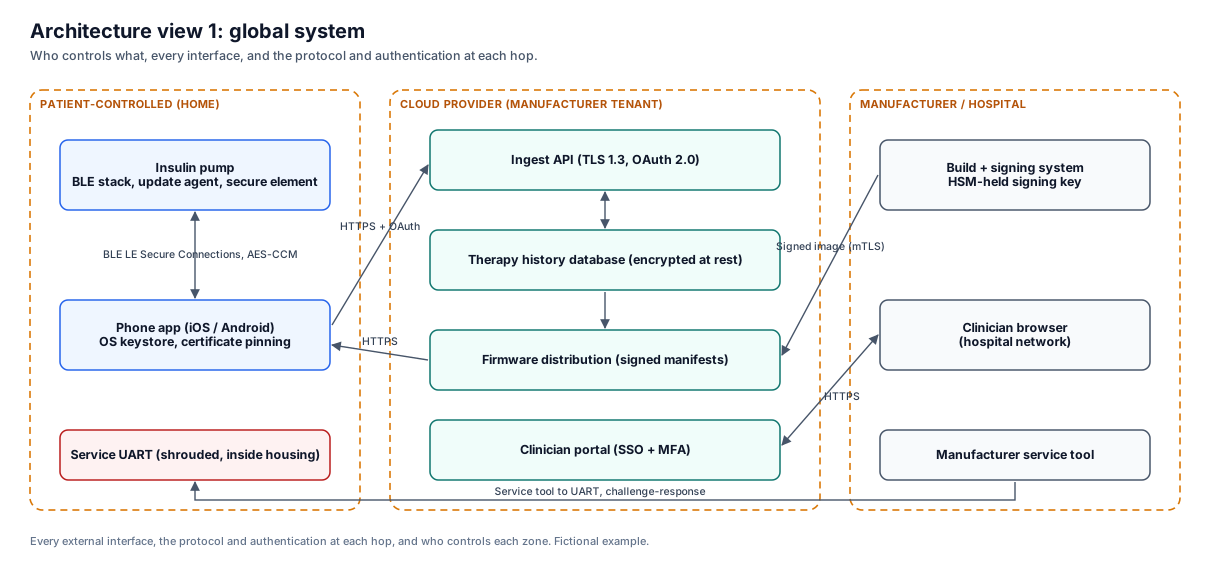
Reviewer note: the service UART appears even though patients never touch it. Leaving out service and debug interfaces is one of the most common reasons this view draws questions.
View 2: multi-patient harm
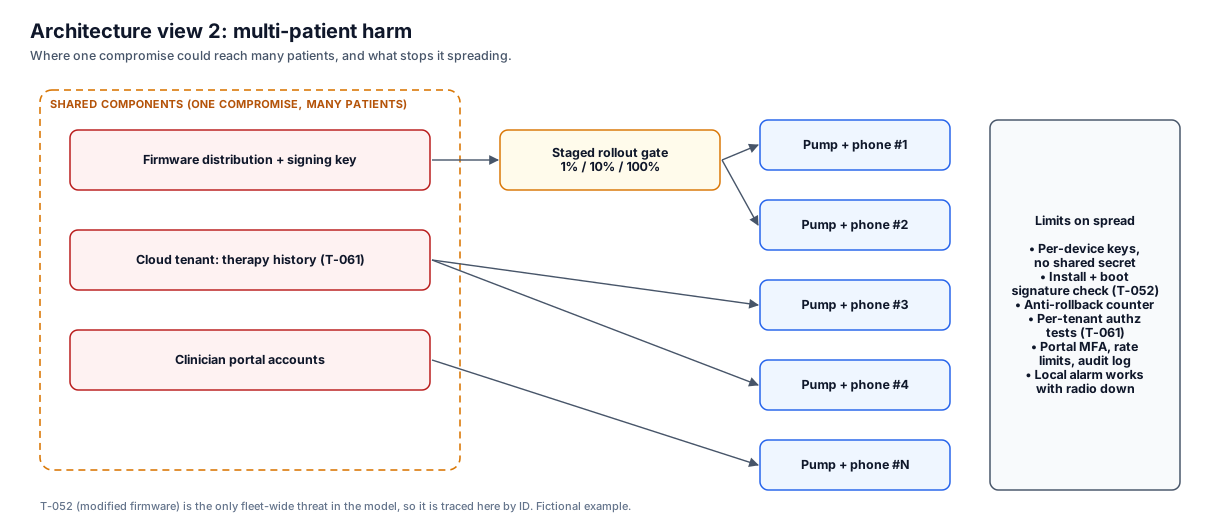
Reviewer note: T-052 (a modified firmware image) is the only fleet-wide threat in the model, so it is named here by ID. The view also says what still works when everything shared is down: the pump's local alarm.
View 3: updatability and patchability
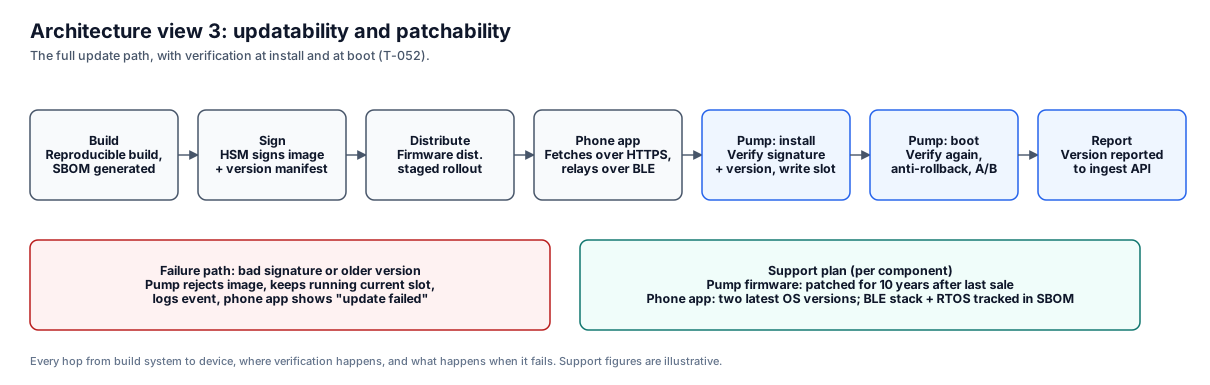
Reviewer note: the signature is checked twice, at install and at every boot, and the failure path is shown. The support figures are illustrative; use the support period you can actually commit to.
View 4: security use case (bolus from phone)
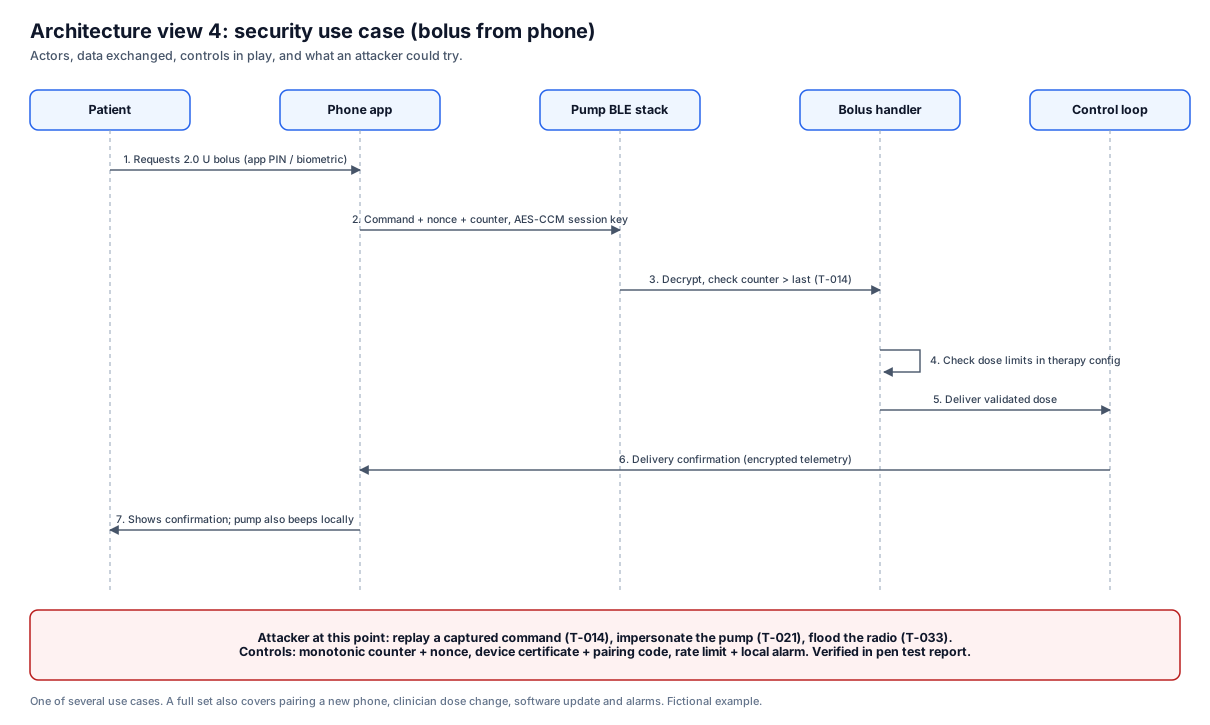
Reviewer note: a full submission repeats this for each important workflow. For this pump that means pairing a new phone, a clinician dose change, a software update, and alarm delivery, each drawn with the same actors.
How the views connect to the rest of the submission
The views are the base layer. The rest of the security documentation builds on them:
- Threat model: every threat should point to a component or trust boundary shown in a view. See our threat model template and worked example and STRIDE guide.
- Security risk assessment: risks tie back to threats, and through the security use case views to patient harm.
- SBOM: components named in the views should match your SBOM.
- Testing: penetration testing scope should cover every interface the global system view shows.
- Traceability: the 18 deliverables map shows where each of these lands in eSTAR.
If you change the architecture, update the views first, then the documents that depend on them.
How the views match the eSTAR architecture diagram
The eSTAR software section asks for a system and software architecture diagram, set by the FDA's June 2023 software guidance. The cybersecurity section asks for the four security views. Reviewers read both, so they should describe the same device.
| eSTAR software architecture diagram | Security architecture views |
|---|---|
| Modules, layers, and how software parts connect | Same parts, plus trust boundaries and data flows |
| Focus on function and design | Focus on where an attacker could get in and what they could reach |
| Device software, with interfaces to other systems | Whole system: device, app, cloud, hospital network, and your own build and signing systems |
| One diagram, more detail at Enhanced level | Four views: global system, multi-patient harm, updatability, and security use cases |
Keep them consistent:
- Start the global system view from the software diagram. Don't redraw the system.
- Use the same component names and counts in both. If the security views add parts (for example a signing server), say so.
- Every interface in the software diagram should cross a trust boundary in the security views.
- Update both diagrams together when the design changes, with the same version number.
The eSTAR software documents guide covers how the other software documents tie to the cybersecurity section.
How the views set the penetration test scope
Our medical device penetration testing is scoped from these views. Each interface in the global system view becomes a test target, each multi-patient harm path gets a test that tries to reach many devices from one entry point, and the updatability view drives tests of the update path, such as loading unsigned or older firmware. Security use cases become abuse cases. In week 1, our test readiness review checks that the views, threat model, and hazard analysis line up before testing starts. Findings in the report point back to the component and trust boundary in the view, so a reviewer can follow the chain from diagram to test result.
Common mistakes
- Drawing the views once for the submission and never updating them after design changes.
- Leaving out manufacturer-side systems such as build servers, signing infrastructure, or support tools.
- Showing the cloud as one box with no detail on what you configure versus what the provider runs.
- Treating the views as marketing diagrams instead of engineering records with versions and owners.
- Writing security use cases only for normal operation and skipping update, service, and decommissioning.
Where to start
At the prototype stage, start with a rough data flow diagram: external entities, processes, data stores, data flows, and trust boundaries. That diagram grows into the global system view. Add the update path as soon as you choose a firmware update method, and note any shared backend that could become a multi-patient harm path. Write security use cases once the main workflows are stable.
How Blue Goat Cyber approaches this
Architecture views are part of the threat modeling work we do on every full-service FDA premarket engagement. We start from your software architecture, instructions for use, and hazard analysis, build the four views with your engineers, and keep the trust boundaries consistent across the threat model, risk assessment, and test scope. If you already have diagrams, we review them against the guidance and tell you what is missing.
Frequently asked questions
Does the FDA require exactly four architecture views?
The February 2026 guidance recommends these four kinds of views as part of the security architecture documentation. Guidance is not binding, but following it is the most direct way to give reviewers what they look for. You can add more views if your device needs them, and security use case views usually come as a set, one per workflow.
What format should the views use?
The guidance does not mandate a diagram notation. Data flow diagrams with clearly marked trust boundaries work well, supported by short text and tables describing each interface. Consistency across documents matters more than the drawing tool.
Are architecture views the same as the threat model?
No. The views describe the system. The threat model uses them to list threats against each component and trust boundary. Reviewers expect both, and they expect them to agree.
Do software-only devices need architecture views?
Yes. Software as a medical device still has interfaces, cloud services, third-party components, and an update path. The views look different from a hardware device's, but the same four questions apply.
When should we start the views?
Start a rough data flow diagram at the prototype stage and refine it as the design settles. Finalize the views once hardware and software are stable, before formal threat modeling and penetration testing.
Get help with your architecture views
Not sure whether your diagrams will hold up in review? Book a discovery session and we will look at your architecture and tell you what each view still needs.